使用 Cilium + CLS 实现网络流日志审计
适用方案:三种部署方案(Native Routing (VPC-CNI)、Overlay (VPC-CNI)、Overlay (GR))均支持,无模式限制。
概述
Cilium 的 cilium-agent 可以将网络流日志(Hubble Flows)写到文件中,它记录了集群中每一条网络连接的详细元数据,包括源/目标 Pod、IP、端口、协议、策略裁决(允许/拒绝)等信息。
网络流日志的常见使用场景包括:
- 安全审计:记录所有网络连接,满足合规要求,追溯异常访问。
- 故障排查:通过检索特定 Pod 或 IP 的网络流日志,快速定位网络不通、连接超时等问题。
- 网络策略验证:查看哪些流量被 NetworkPolicy 拒绝(verdict=DROPPED),验证策略是否符合预期。
- 流量分析:分析集群内外的流量模式,识别异常流量。
本文介绍如何将 Cilium 的网络流日志导出到文件,并借助腾讯云 CLS 日志服务进行采集和检索分析。
整体架构
整体数据流转如下:
┌──────────────┐    ┌──────────────┐    ┌──────────────┐    ┌──────────────┐
│    Hubble    │    │  Export to   │    │  CLS Agent   │    │  CLS Search  │
│    Server    │───▶│  Log Files   │───▶│  Collect     │───▶│  & Analyze   │
│  (per node)  │    │ (cilium pod) │    │              │    │              │
└──────────────┘    └──────────────┘    └──────────────┘    └──────────────┘
- Hubble Server:内置在每个节点的 cilium-agent 中,默认开启,负责观测和记录网络流日志。
- 日志导出:通过 Hubble 的动态导出功能,将网络流日志写入 cilium pod 内的本地文件。
- CLS Agent:TKE 的日志采集组件,负责从 cilium pod 中采集日志文件并上报到 CLS。
- CLS 检索分析:在 CLS 控制台中对网络流日志进行检索、过滤和分析。
将网络流日志导出到文件
基本配置
启用 Hubble 动态日志导出并配置导出规则:
helm upgrade cilium cilium/cilium --version 1.20.1 \
   --namespace kube-system \
   --reuse-values \
   --set hubble.enabled=true \
   --set hubble.export.dynamic.enabled=true \
   --set hubble.export.dynamic.config.content[0].name=all \
   --set hubble.export.dynamic.config.content[0].filePath=/var/run/cilium/hubble/events-all.log \
   --set hubble.export.dynamic.config.content[0].excludeFilters[0].source_ip[0]=169.254.0.71 \
   --set hubble.export.dynamic.config.content[0].excludeFilters[1].destination_ip[0]=169.254.0.71
以上配置的含义是:
- 导出所有网络流日志到
/var/run/cilium/hubble/events-all.log文件。 - 排除源 IP 或目标 IP 为
169.254.0.71的流量(这是 CLS API 地址,排除的原因见常见问题中的excludeFilters 为什么要加 169.254.0.71?)。
导出配置详解
Hubble 支持静态导出和动态导出两种方式:
| 对比项 | 静态导出 | 动态导出 |
|---|---|---|
| 启用方式 | hubble.export.static.enabled=true | hubble.export.dynamic.enabled=true |
| 规则数量 | 仅支持一组过滤规则 | 支持多组规则,各自导出到不同文件 |
| 配置变更 | 需要重启 cilium pod | 无需重启,修改 ConfigMap 后自动生效 |
| 过滤语法 | allowList / denyList | includeFilters / excludeFilters |
推荐使用动态导出,它更灵活,支持多规则配置,且修改配置后无需重启 pod。
过滤器
includeFilters 和 excludeFilters 完整的过滤器字段列表参考源码 flow.proto 中的 FlowFilter message 定义,以下是常用字段:
| 字段 | 说明 | 示例 |
|---|---|---|
source_pod | 源 Pod(格式:namespace/pod-name) | ["kube-system/coredns"] |
destination_pod | 目标 Pod | ["default/nginx"] |
source_ip | 源 IP | ["10.0.1.100"] |
destination_ip | 目标 IP | ["10.0.2.200"] |
verdict | 策略裁决 | ["DROPPED"]、["FORWARDED"] |
event_type | 事件类型 | [{"type": 1}] |
同一个 filter 对象中的多个字段为 AND 关系,同一数组中的多个 filter 对象为 OR 关系。
fieldMask(字段裁剪)
如果不需要导出所有字段,可以使用 fieldMask 只保留需要的字段,减少日志体积:
helm upgrade cilium cilium/cilium --version 1.20.1 \
   --namespace kube-system \
   --reuse-values \
   --set hubble.enabled=true \
   --set hubble.export.dynamic.enabled=true \
   --set hubble.export.dynamic.config.content[0].name=dropped \
   --set hubble.export.dynamic.config.content[0].filePath=/var/run/cilium/hubble/dropped.log \
   --set hubble.export.dynamic.config.content[0].includeFilters[0].verdict[0]=DROPPED \
   --set hubble.export.dynamic.config.content[0].fieldMask[0]=time \
   --set hubble.export.dynamic.config.content[0].fieldMask[1]=source.namespace \
   --set hubble.export.dynamic.config.content[0].fieldMask[2]=source.pod_name \
   --set hubble.export.dynamic.config.content[0].fieldMask[3]=destination.namespace \
   --set hubble.export.dynamic.config.content[0].fieldMask[4]=destination.pod_name \
   --set hubble.export.dynamic.config.content[0].fieldMask[5]=IP \
   --set hubble.export.dynamic.config.content[0].fieldMask[6]=l4 \
   --set hubble.export.dynamic.config.content[0].fieldMask[7]=verdict \
   --set hubble.export.dynamic.config.content[0].fieldMask[8]=drop_reason_desc
以上配置只导出被 DROP 的流量,且只保留时间、源/目标 Pod、IP、四层协议、裁决结果和丢包原因这些关键字段。
fieldMask 的字段路径使用点号(.)分隔嵌套字段,完整的可用字段列表基于 flow.proto 中的 Flow message 定义,以下是常用字段:
| 字段路径 | 说明 |
|---|---|
time | 流量发生的时间 |
verdict | 策略裁决(FORWARDED / DROPPED / ERROR) |
drop_reason_desc | 丢包原因描述 |
IP | 完整的 IP 信息(含源/目标 IP) |
IP.source | 源 IP |
IP.destination | 目标 IP |
l4 | 完整的四层协议信息 |
l4.TCP.source_port | TCP 源端口 |
l4.TCP.destination_port | TCP 目标端口 |
l4.UDP.source_port | UDP 源端口 |
l4.UDP.destination_port | UDP 目标端口 |
source | 完整的源端点信息 |
source.namespace | 源 Pod 所在 Namespace |
source.pod_name | 源 Pod 名称 |
source.labels | 源端点的标签 |
source.identity | 源端点的 Cilium Identity |
source.workloads | 源端点的 Workload 信息 |
destination | 完整的目标端点信息 |
destination.namespace | 目标 Pod 所在 Namespace |
destination.pod_name | 目标 Pod 名称 |
destination.labels | 目标端点的标签 |
destination.identity | 目标端点的 Cilium Identity |
destination.workloads | 目标端点的 Workload 信息 |
node_name | 节点名称 |
node_labels | 节点标签 |
is_reply | 是否为回复包 |
traffic_direction | 流量方向(INGRESS / EGRESS) |
trace_reason | 追踪原因 |
event_type | 事件类型 |
source_service.name | 源 Service 名称 |
source_service.namespace | 源 Service 所在 Namespace |
destination_service.name | 目标 Service 名称 |
destination_service.namespace | 目标 Service 所在 Namespace |
l7 | 七层协议信息(DNS/HTTP 等) |
l7.dns | DNS 请求/响应信息 |
l7.http | HTTP 请求/响应信息 |
interface | 网络接口信息 |
Summary | 流量摘要(已废弃) |
多规则配置
动态导出支持同时配置多组规则,每组规则可以导出到不同的文件,适用于按场景分类导出:
helm upgrade cilium cilium/cilium --version 1.20.1 \
   --namespace kube-system \
   --reuse-values \
   --set hubble.enabled=true \
   --set hubble.export.dynamic.enabled=true \
   --set hubble.export.dynamic.config.content[0].name=all \
   --set hubble.export.dynamic.config.content[0].filePath=/var/run/cilium/hubble/events-all.log \
   --set hubble.export.dynamic.config.content[0].excludeFilters[0].source_ip[0]=169.254.0.71 \
   --set hubble.export.dynamic.config.content[0].excludeFilters[1].destination_ip[0]=169.254.0.71 \
   --set hubble.export.dynamic.config.content[1].name=dropped \
   --set hubble.export.dynamic.config.content[1].filePath=/var/run/cilium/hubble/dropped.log \
   --set hubble.export.dynamic.config.content[1].includeFilters[0].verdict[0]=DROPPED
以上配置定义了两组规则:
- all:导出所有流量(排除 CLS API 地址)。
- dropped:只导出被拒绝的流量,方便快速定位 NetworkPolicy 相关问题。
日志轮转
导出的日志文件会自动轮转,可通过以下参数配置:
| 参数 | 说明 | 默认值 |
|---|---|---|
hubble.export.fileMaxSizeMb | 单个日志文件的最大大小(MB) | 10 |
hubble.export.fileMaxBackups | 保留的轮转文件数量 | 5 |
hubble.export.fileCompress | 是否压缩轮转后的文件 | false |
如果日志量较大,可以适当调大文件大小和备份数量:
helm upgrade cilium cilium/cilium --version 1.20.1 \
   --namespace kube-system \
   --reuse-values \
   --set hubble.export.fileMaxSizeMb=50 \
   --set hubble.export.fileMaxBackups=10 \
   --set hubble.export.fileCompress=true
日志格式说明
导出的日志每行是一个 JSON 对象,包含完整的网络流日志信息。以下是一条示例日志(已格式化)—— test 命名空间中的 curl Pod 向 nginx Pod 发起 HTTP 请求:
{
  "flow": {
    "IP": {
      "destination": "10.20.0.9",
      "ipVersion": "IPv4",
      "source": "10.20.0.10"
    },
    "Summary": "TCP Flags: ACK",
    "Type": "L3_L4",
    "destination": {
      "cluster_name": "default",
      "identity": 27312,
      "labels": [
        "k8s:app=nginx",
        "k8s:io.cilium.k8s.namespace.labels.kubernetes.io/metadata.name=test",
        "k8s:io.cilium.k8s.policy.cluster=default",
        "k8s:io.cilium.k8s.policy.serviceaccount=default",
        "k8s:io.kubernetes.pod.namespace=test"
      ],
      "namespace": "test",
      "pod_name": "nginx-54c98b4f84-sw9q9"
    },
    "emitter": {
      "name": "Hubble",
      "version": "1.20.1+7d68cfb3"
    },
    "ethernet": {
      "destination": "02:21:a9:ff:89:f4",
      "source": "ce:0a:b9:d8:63:61"
    },
    "event_type": {
      "sub_type": 3,
      "type": 4
    },
    "is_reply": false,
    "l4": {
      "TCP": {
        "destination_port": 80,
        "flags": {
          "ACK": true
        },
        "source_port": 56598
      }
    },
    "node_labels": [
      "beta.kubernetes.io/arch=amd64",
      "beta.kubernetes.io/instance-type=S5.MEDIUM4",
      "beta.kubernetes.io/os=linux",
      "cloud.tencent.com/auto-scaling-group-id=asg-q9zxcooe",
      "cloud.tencent.com/node-instance-id=ins-f5wpfrc5",
      "failure-domain.beta.kubernetes.io/region=cd",
      "failure-domain.beta.kubernetes.io/zone=160001",
      "kubernetes.io/arch=amd64",
      "kubernetes.io/hostname=10.10.21.35",
      "kubernetes.io/os=linux",
      "node.kubernetes.io/instance-type=S5.MEDIUM4",
      "node.tke.cloud.tencent.com/accelerator-type=cpu",
      "node.tke.cloud.tencent.com/cpu=2",
      "node.tke.cloud.tencent.com/memory=4",
      "os=tencentos4",
      "tke.cloud.tencent.com/cbs-mountable=true",
      "tke.cloud.tencent.com/nodepool-id=np-p8uyib3x",
      "tke.cloud.tencent.com/route-eni-subnet-ids=subnet-fg9qdb1f",
      "topology.com.tencent.cloud.csi.cbs/zone=ap-chengdu-1",
      "topology.kubernetes.io/region=cd",
      "topology.kubernetes.io/zone=160001"
    ],
    "node_name": "10.10.21.35",
    "source": {
      "ID": 3863,
      "cluster_name": "default",
      "identity": 4368,
      "labels": [
        "k8s:app=curl",
        "k8s:io.cilium.k8s.namespace.labels.kubernetes.io/metadata.name=test",
        "k8s:io.cilium.k8s.policy.cluster=default",
        "k8s:io.cilium.k8s.policy.serviceaccount=default",
        "k8s:io.kubernetes.pod.namespace=test"
      ],
      "namespace": "test",
      "pod_name": "curl-7d4d858f75-j76f7",
      "workloads": [
        {
          "kind": "Deployment",
          "name": "curl"
        }
      ]
    },
    "time": "2026-02-25T03:25:54.227004477Z",
    "trace_observation_point": "TO_STACK",
    "trace_reason": "ESTABLISHED",
    "traffic_direction": "EGRESS",
    "uuid": "a38e44fa-b7b7-4f8f-a40b-2c1dd2621140",
    "verdict": "FORWARDED"
  },
  "node_name": "10.10.21.35",
  "time": "2026-02-25T03:25:54.227004477Z"
}
关键字段说明:
| 字段 | 说明 |
|---|---|
flow.time | 流量发生的时间 |
flow.verdict | 策略裁决:FORWARDED(放行)、DROPPED(拒绝)、ERROR(错误) |
flow.IP | 源/目标 IP 地址 |
flow.l4 | 四层协议信息(TCP/UDP 的端口、标志位等) |
flow.source / flow.destination | 源/目标的 Pod 名称、命名空间、标签、workload 等 |
flow.traffic_direction | 流量方向:INGRESS 或 EGRESS |
flow.drop_reason_desc | 丢包原因描述(仅当 verdict 为 DROPPED 时有值) |
flow.is_reply | 是否为回复包 |
flow.Summary | 流量摘要信息 |
启用七层日志
默认情况下,Hubble 只记录 L3/L4 层的网络流日志(IP、端口、协议等)。如果需要记录七层协议的详细信息(如 DNS 查询内容、HTTP 请求方法和 URL 等),需要通过 CiliumNetworkPolicy 配置 L7 规则来启用。
启用 L7 可观测需要 L7 Proxy(Envoy)支持,Cilium 默认已部署 Envoy DaemonSet。匹配 L7 规则的流量会被重定向到 Envoy 代理进行解析,这会带来一定的性能开销。建议仅对需要审计的流量启用 L7 规则。
配置示例
以下 CiliumNetworkPolicy 对 default 命名空间的 Pod 启用 DNS 和 HTTP 的七层可观测:
apiVersion: "cilium.io/v2"
kind: CiliumNetworkPolicy
metadata:
  name: "l7-visibility"
  namespace: default
spec:
  endpointSelector:
    matchLabels: {}
  egress:
    - toPorts:
        - ports:
            - port: "53"
              protocol: ANY
          rules:
            dns:
              - matchPattern: "*"
    - toEndpoints:
        - matchLabels:
            "k8s:io.kubernetes.pod.namespace": default
      toPorts:
        - ports:
            - port: "80"
              protocol: TCP
            - port: "8080"
              protocol: TCP
          rules:
            http: [{}]
以上策略的含义:
- DNS 规则:对所有 DNS 出口流量(TCP/UDP 53)启用七层可观测,使用
matchPattern: "*"放行所有 DNS 查询。 - HTTP 规则:对发往
default命名空间 Pod 的 HTTP 出口流量(TCP 80/8080)启用七层可观测,使用http: [{}]放行所有 HTTP 请求。
L7 规则不仅启用可观测,同时也会限制流量 —— 不匹配规则的流量将被拒绝。请根据实际需求配置规则,确保合法流量不被误拦截。
支持的七层协议
| 协议 | 规则类型 | 说明 |
|---|---|---|
| DNS | dns | 记录 DNS 查询域名、响应 IP、TTL 等。仅支持出口(egress)方向 |
| HTTP | http | 记录 HTTP 方法、URL、状态码、响应延迟等 |
cilium 1.18 起 Kafka L7 规则废弃、1.20 已彻底移除(策略 L7 规则仅剩 HTTP/DNS)。若从旧版本升级且存量策略中还有 kafka 规则,升级前必须删除,否则新版本下策略校验会失败。
L7 日志字段
启用七层可观测后,导出的网络流日志中 flow.l7 字段会包含七层协议的详细信息:
DNS 日志字段:
| 字段 | 说明 |
|---|---|
l7.type | 流类型:REQUEST 或 RESPONSE |
l7.latency_ns | 响应延迟(纳秒) |
l7.dns.query | DNS 查询的域名 |
l7.dns.ips | DNS 响应中的 IP 列表 |
l7.dns.ttl | DNS 响应的 TTL |
l7.dns.rcode | DNS 返回码(0=成功,3=NXDOMAIN 等) |
l7.dns.qtypes | 查询类型(A、AAAA、CNAME 等) |
l7.dns.rrtypes | 响应资源记录类型 |
HTTP 日志字段:
| 字段 | 说明 |
|---|---|
l7.type | 流类型:REQUEST 或 RESPONSE |
l7.latency_ns | 响应延迟(纳秒) |
l7.http.code | HTTP 状态码(如 200、404) |
l7.http.method | HTTP 方法(GET、POST 等) |
l7.http.url | 请求 URL |
l7.http.protocol | HTTP 协议版本(如 HTTP/1.1) |
l7.http.headers | HTTP 头信息(key/value 列表) |
安全注意事项
L7 日志可能包含敏感信息(URL 中的查询参数、认证信息等)。Cilium 提供了脱敏配置:
helm upgrade cilium cilium/cilium --version 1.20.1 \
   --namespace kube-system \
   --reuse-values \
   --set hubble.redact.enabled=true \
   --set hubble.redact.http.urlQuery=true \
   --set hubble.redact.http.userInfo=true
hubble.redact.http.urlQuery:脱敏 URL 中的查询参数。hubble.redact.http.userInfo:脱敏 URL 中的用户认证信息。
将网络流日志投递到 CLS
配置 TKE 日志采集,将所有 cilium-agent 中的日志流文件采集到 CLS。
启用日志采集功能
在配置日志采集规则前,先确保集群开通了日志采集功能,控制台操作路径:监控告警>日志>业务日志。
通过 YAML 配置(推荐)
TKE 使用 LogConfig 这个 CRD 配置日志采集规则,通过这种方式配置可以快捷配置索引,避免在控制台大量手动操作。完整 LogConfig 配置如下:
通过
kubectl apply -f <your-logconfig-yaml-file>进行配置。
需根据注释替换相关字段。
apiVersion: cls.cloud.tencent.com/v1
kind: LogConfig
metadata:
  name: cilium-flow-logs
spec:
  clsDetail:
    region: ap-chengdu # 替换成你的 CLS 所在地域,可用列表参考 https://cloud.tencent.com/document/product/614/18940
    logsetName: "TKE-cls-k398qwbj-102564" # 替换成你的 CLS 日志集名称。如果存在该名称的日志集,则会使用该日志集,如果不存在,则会新建一个该名称的日志集。
    topicName: "tke-cls-k398qwbj-cilium-flow-logs" # 替换成你的 CLS 日志主题名称,自动创建出来的日志主题会使用该名称。
    extractRule:
      backtracking: "0"
      isGBK: "false"
      jsonStandard: "true"
      timeFormat: '%Y-%m-%dT%H:%M:%S.%f%z'
      timeKey: time
      unMatchUpload: "true"
      unMatchedKey: LogParseFailure
    indexStatus: "on"
    indexs:
    - indexName: namespace
      indexType: text
      tokenizer: "@&?|#()='\",;:<>[]{}/ \n\t\r\\"
      containZH: false
    - indexName: pod_name
      indexType: text
      tokenizer: "@&?|#()='\",;:<>[]{}/ \n\t\r\\"
      containZH: false
    - indexName: container_name
      indexType: text
      tokenizer: "@&?|#()='\",;:<>[]{}/ \n\t\r\\"
      containZH: false
    - indexName: flow.verdict
      indexType: text
      tokenizer: "@&?|#()='\",;:<>[]{}/ \n\t\r\\"
      containZH: false
    - indexName: flow.uuid
      indexType: text
      tokenizer: "@&?|#()='\",;:<>[]{}/ \n\t\r\\"
      containZH: false
    - indexName: flow.drop_reason_desc
      indexType: text
      tokenizer: "@&?|#()='\",;:<>[]{}/ \n\t\r\\"
      containZH: false
    - indexName: flow.source.pod_name
      indexType: text
      tokenizer: "@&?|#()='\",;:<>[]{}/ \n\t\r\\"
      containZH: false
    - indexName: flow.source.namespace
      indexType: text
      tokenizer: "@&?|#()='\",;:<>[]{}/ \n\t\r\\"
      containZH: false
    - indexName: flow.source.cluster_name
      indexType: text
      tokenizer: "@&?|#()='\",;:<>[]{}/ \n\t\r\\"
      containZH: false
    - indexName: flow.source.labels
      indexType: text
      tokenizer: "@&?|#()='\",;:<>[]{}/ \n\t\r\\"
      containZH: false
    - indexName: flow.source.identity
      indexType: text
      tokenizer: "@&?|#()='\",;:<>[]{}/ \n\t\r\\"
      containZH: false
    - indexName: flow.destination.pod_name
      indexType: text
      tokenizer: "@&?|#()='\",;:<>[]{}/ \n\t\r\\"
      containZH: false
    - indexName: flow.destination.namespace
      indexType: text
      tokenizer: "@&?|#()='\",;:<>[]{}/ \n\t\r\\"
      containZH: false
    - indexName: flow.destination.cluster_name
      indexType: text
      tokenizer: "@&?|#()='\",;:<>[]{}/ \n\t\r\\"
      containZH: false
    - indexName: flow.destination.labels
      indexType: text
      tokenizer: "@&?|#()='\",;:<>[]{}/ \n\t\r\\"
      containZH: false
    - indexName: flow.destination.identity
      indexType: text
      tokenizer: "@&?|#()='\",;:<>[]{}/ \n\t\r\\"
      containZH: false
    - indexName: flow.destination_service.name
      indexType: text
      tokenizer: "@&?|#()='\",;:<>[]{}/ \n\t\r\\"
      containZH: false
    - indexName: flow.destination_service.namespace
      indexType: text
      tokenizer: "@&?|#()='\",;:<>[]{}/ \n\t\r\\"
      containZH: false
    - indexName: flow.IP.ipVersion
      indexType: text
      tokenizer: "@&?|#()='\",;:<>[]{}/ \n\t\r\\"
      containZH: false
    - indexName: flow.IP.source
      indexType: text
      tokenizer: "@&?|#()='\",;:<>[]{}/ \n\t\r\\"
      containZH: false
    - indexName: flow.IP.destination
      indexType: text
      tokenizer: "@&?|#()='\",;:<>[]{}/ \n\t\r\\"
      containZH: false
    - indexName: flow.l4
      indexType: text
      tokenizer: "@&?|#()='\",;:<>[]{}/ \n\t\r\\"
      containZH: false
    - indexName: flow.l7
      indexType: text
      tokenizer: "@&?|#()='\",;:<>[]{}/ \n\t\r\\"
      containZH: false
    - indexName: flow.l4.TCP.source_port
      indexType: long
    - indexName: flow.l4.TCP.destination_port
      indexType: long
    - indexName: flow.l4.UDP.source_port
      indexType: long
    - indexName: flow.l4.UDP.destination_port
      indexType: long
    - indexName: flow.event_type.type
      indexType: text
      tokenizer: "@&?|#()='\",;:<>[]{}/ \n\t\r\\"
      containZH: false
    - indexName: flow.event_type.sub_type
      indexType: text
      tokenizer: "@&?|#()='\",;:<>[]{}/ \n\t\r\\"
      containZH: false
    - indexName: flow.Summary
      indexType: text
      tokenizer: "@&?|#()='\",;:<>[]{}/ \n\t\r\\"
      containZH: false
    - indexName: flow.traffic_direction
      indexType: text
      tokenizer: "@&?|#()='\",;:<>[]{}/ \n\t\r\\"
      containZH: false
    - indexName: flow.trace_reason
      indexType: text
      tokenizer: "@&?|#()='\",;:<>[]{}/ \n\t\r\\"
      containZH: false
    - indexName: flow.is_reply
      indexType: text
      tokenizer: "@&?|#()='\",;:<>[]{}/ \n\t\r\\"
      containZH: false
    - indexName: flow.Type
      indexType: text
      tokenizer: "@&?|#()='\",;:<>[]{}/ \n\t\r\\"
      containZH: false
    - indexName: flow.node_labels
      indexType: text
      tokenizer: "@&?|#()='\",;:<>[]{}/ \n\t\r\\"
      containZH: false
    - indexName: flow.file
      indexType: text
      tokenizer: "@&?|#()='\",;:<>[]{}/ \n\t\r\\"
      containZH: false
    autoIndex: "true"
    logFormat: default
    logType: json_log
    maxSplitPartitions: 0
    period: 30
    storageType: ""
  inputDetail:
    type: container_file
    containerFile:
      namespace: kube-system
      workload:
        kind: daemonset
        name: cilium
      container: cilium-agent
      filePaths:
      - file: '*.log'
        path: /var/run/cilium/hubble
      metadataContainer:
      - namespace
      - pod_name
      - pod_ip
      - pod_uid
      - container_id
      - container_name
      - image_name
      - cluster_id
      metadataLabels:
      - __NULL__
      nodeMetadataLabels:
      - __NULL__
通过控制台配置
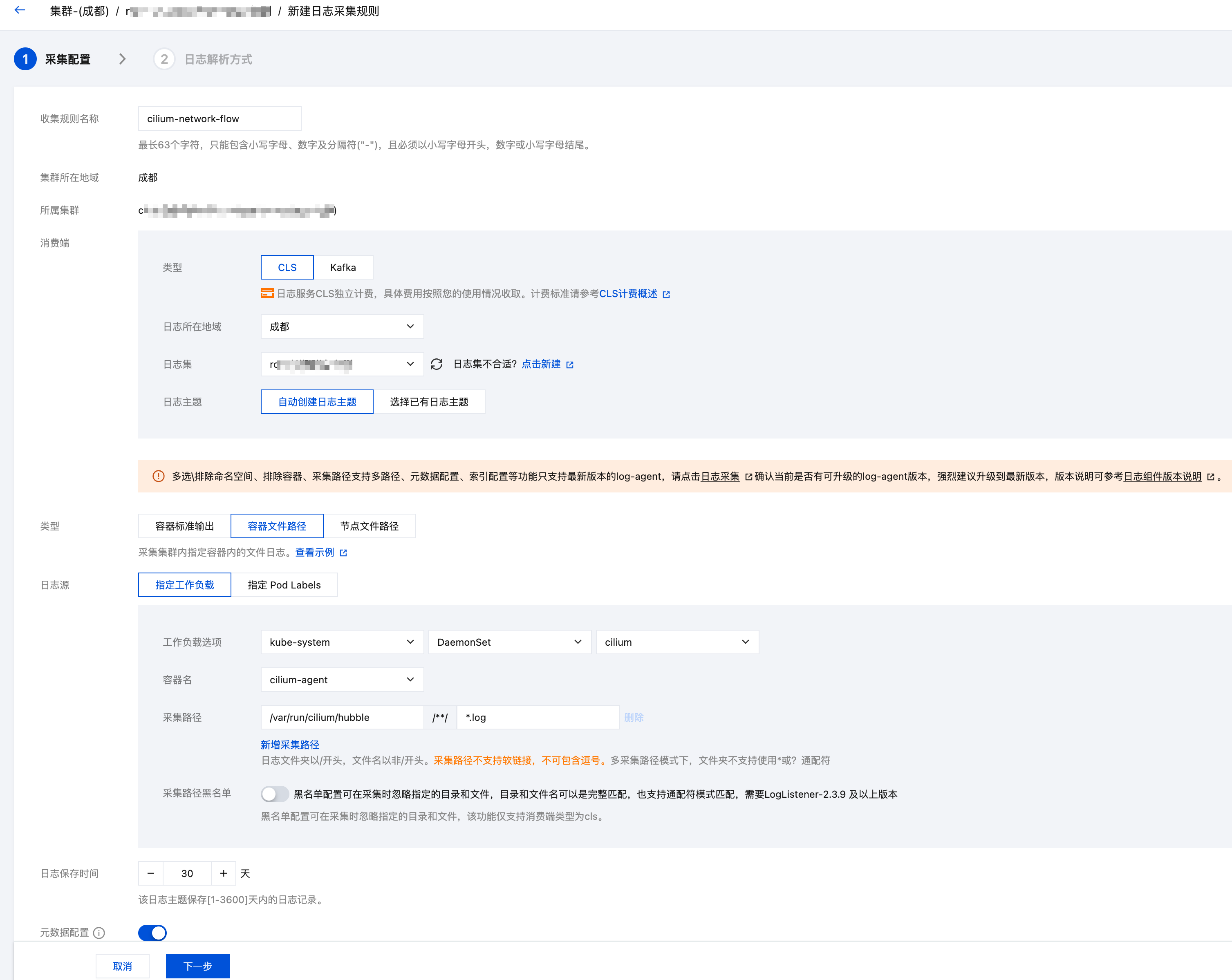
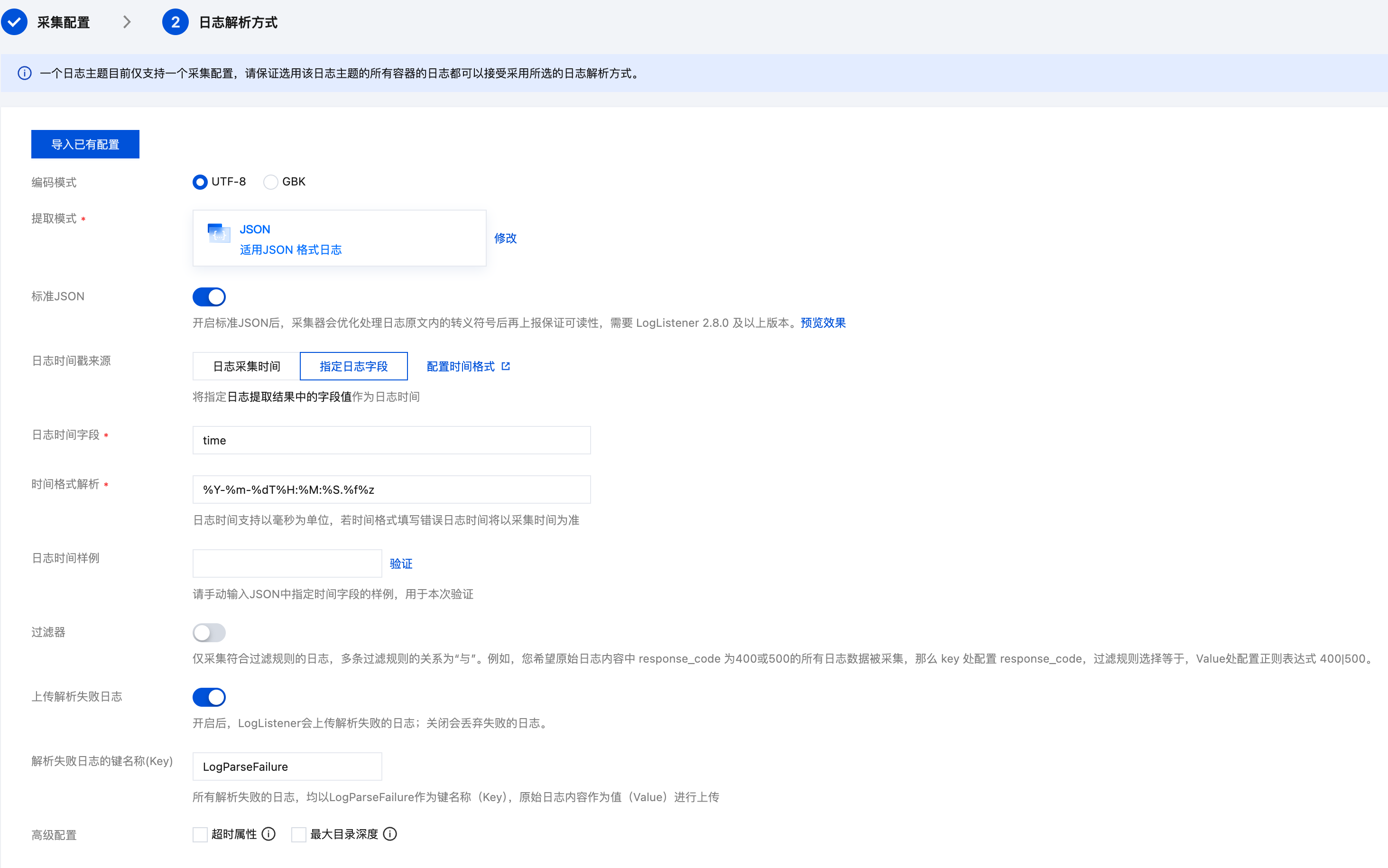
如有必要,你也可以在 TKE 控制台配置日志采集规则,在 TKE 集群的 监控告警>日志>业务日志 下新建日志规则,部分配置参考截图:
CLS 检索示例
日志投递到 CLS 后,可以在 CLS 控制台进行各种维度的检索分析。以下是一些常用的检索语句:
查询某个 Pod 的所有网络流日志
flow.source.pod_name:"nginx-deployment-abc123" OR flow.destination.pod_name:"nginx-deployment-abc123"
查询被拒绝的流量
flow.verdict:"DROPPED"
查看详细的丢包原因:
flow.verdict:"DROPPED" | select flow.drop_reason_desc, flow.source.namespace, flow.source.pod_name, flow.destination.namespace, flow.destination.pod_name, count(*) as cnt group by flow.drop_reason_desc, flow.source.namespace, flow.source.pod_name, flow.destination.namespace, flow.destination.pod_name order by cnt desc
按命名空间过滤
查询从 default 命名空间发出的所有流量:
flow.source.namespace:"default"
查询发往 kube-system 命名空间的所有流量:
flow.destination.namespace:"kube-system"
按端口过滤
查询目标端口为 80 的流量:
flow.l4.TCP.destination_port:80
查询某个 IP 的所有流量
flow.IP.source:"10.0.1.100" OR flow.IP.destination:"10.0.1.100"
按流量方向过滤
只看入站流量:
flow.traffic_direction:"INGRESS"
相关产品
腾讯云网络流日志 FL 也提供了类似的网络流日志功能,它基于 VPC 层面采集流日志,与 Cilium Hubble 的网络流日志有以下区别:
| 对比项 | Cilium Hubble 网络流日志 | 腾讯云网络流日志 FL |
|---|---|---|
| 采集层级 | Pod 级别,基于 eBPF | VPC 级别,基于弹性网卡 |
| 信息丰富度 | 包含 Pod 名称、标签、Namespace、NetworkPolicy 裁决等 K8s 元数据,甚至还支持七层信息 | 主要包含 IP、端口、协议等网络层信息 |
| 过滤能力 | 支持按 Pod、标签、裁决等 K8s 维度过滤 | 支持按 VPC、子网、弹性网卡过滤 |
| 适用场景 | Kubernetes 集群内网络可观测 | VPC 级别的网络流量审计 |
可根据实际需求选择使用,两者也可以互补:Cilium 提供 K8s 层面的精细化网络流日志,FL 提供 VPC 层面的全局网络流日志。
常见问题
Hubble 动态日志导出配置存到哪里的?
存在 kube-system/cilium-flowlog-config 这个 ConfigMap 中的,可以通过 kubectl 查看当前配置:
$ kubectl -n kube-system get cm cilium-flowlog-config -o yaml
apiVersion: v1
data:
  flowlogs.yaml: |
    flowLogs:
      - excludeFilters:
        - source_ip:
          - 169.254.0.71
        - destination_ip:
          - 169.254.0.71
        filePath: /var/run/cilium/hubble/events-all.log
        name: all
kind: ConfigMap
metadata:
  annotations:
    meta.helm.sh/release-name: cilium
    meta.helm.sh/release-namespace: kube-system
  creationTimestamp: "2026-02-24T08:35:22Z"
  labels:
    app.kubernetes.io/managed-by: Helm
  name: cilium-flowlog-config
  namespace: kube-system
  resourceVersion: "3969239884"
  uid: 87978d03-638a-4c31-80d2-0a3e0fe17049
CLS 为什么没有自动创建日志主题?
确保 logsetName 和 topicName 都配置,且没有跟 topicName 同名的已有日志主题存在,也不要指定 topicId 和 logsetId。
哪里查看完整的 LogConfig 配置字段参考?
TKE 的日志采集规则 LogConfig 完整字段参考 LogConfig json 格式说明
excludeFilters 为什么要加 169.254.0.71?
169.254.0.71 是 CLS 的 API 地址的目标 IP,采集的日志最终会通过这个 IP 上报,如果没有指定 includeFilters,需加上这个 excludeFilters 避免将上报 CLS 日志的流量也作为 cilium 网络流日志记录下来,然后又采集这个日志,又上报,导致无限循环采集上报,即便在没有其他网络流量的情况下也会一直产生和采集新日志,造成不必要的开销。