Network Flow Log Audit with Cilium + CLS
Applicable modes: all three deployment modes (Native Routing (VPC-CNI), Overlay (VPC-CNI), Overlay (GR)) are supported, with no mode-specific limitations.
Overview
Cilium's cilium-agent can write network flow logs (Hubble Flows) to files, recording detailed metadata for every network connection in the cluster, including source/destination Pod, IP, port, protocol, and policy verdict (allowed/denied).
Common use cases for network flow logs:
- Security audit: Record all network connections for compliance requirements and trace abnormal access.
- Troubleshooting: Quickly locate network issues such as connectivity failures or timeouts by searching flow logs for specific Pods or IPs.
- Network policy verification: Check which traffic is dropped by NetworkPolicy (verdict=DROPPED) to validate policy behavior.
- Traffic analysis: Analyze traffic patterns inside and outside the cluster to identify anomalous traffic.
This article covers how to export Cilium network flow logs to files and use Tencent Cloud CLS log service for collection, search, and analysis.
Architecture
The overall data flow is as follows:
┌──────────────┐    ┌──────────────┐    ┌──────────────┐    ┌──────────────┐
│    Hubble    │    │  Export to   │    │  CLS Agent   │    │  CLS Search  │
│    Server    │───▶│  Log Files   │───▶│  Collect     │───▶│  & Analyze   │
│  (per node)  │    │ (cilium pod) │    │              │    │              │
└──────────────┘    └──────────────┘    └──────────────┘    └──────────────┘
- Hubble Server: Built into each node's cilium-agent, enabled by default, responsible for observing and recording network flow logs.
- Log Export: Uses Hubble's dynamic export feature to write network flow logs to local files within the cilium pod.
- CLS Agent: TKE's log collection component, responsible for collecting log files from cilium pods and reporting them to CLS.
- CLS Search & Analysis: Search, filter, and analyze network flow logs in the CLS console.
Exporting Network Flow Logs to Files
Basic Configuration
Enable Hubble dynamic log export and configure export rules:
helm upgrade cilium cilium/cilium --version 1.20.1 \
   --namespace kube-system \
   --reuse-values \
   --set hubble.enabled=true \
   --set hubble.export.dynamic.enabled=true \
   --set hubble.export.dynamic.config.content[0].name=all \
   --set hubble.export.dynamic.config.content[0].filePath=/var/run/cilium/hubble/events-all.log \
   --set hubble.export.dynamic.config.content[0].excludeFilters[0].source_ip[0]=169.254.0.71 \
   --set hubble.export.dynamic.config.content[0].excludeFilters[1].destination_ip[0]=169.254.0.71
The above configuration means:
- Export all network flow logs to
/var/run/cilium/hubble/events-all.log. - Exclude traffic where source IP or destination IP is
169.254.0.71(the CLS API address; see Why add 169.254.0.71 in excludeFilters? in FAQ for the reason).
Export Configuration Details
Hubble supports both static export and dynamic export:
| Feature | Static Export | Dynamic Export |
|---|---|---|
| Enable | hubble.export.static.enabled=true | hubble.export.dynamic.enabled=true |
| Rules | Only one filter rule | Multiple rules, each exporting to a different file |
| Config change | Requires cilium pod restart | No restart needed, takes effect after ConfigMap update |
| Filter syntax | allowList / denyList | includeFilters / excludeFilters |
Dynamic export is recommended as it is more flexible, supports multiple rules, and does not require pod restarts when modifying configuration.
Filters
The complete list of filter fields for includeFilters and excludeFilters is defined in the FlowFilter message in the flow.proto source. Common fields include:
| Field | Description | Example |
|---|---|---|
source_pod | Source Pod (format: namespace/pod-name) | ["kube-system/coredns"] |
destination_pod | Destination Pod | ["default/nginx"] |
source_ip | Source IP | ["10.0.1.100"] |
destination_ip | Destination IP | ["10.0.2.200"] |
verdict | Policy verdict | ["DROPPED"], ["FORWARDED"] |
event_type | Event type | [{"type": 1}] |
Multiple fields within the same filter object are in an AND relationship, while multiple filter objects in the same array are in an OR relationship.
fieldMask (Field Trimming)
If you do not need to export all fields, use fieldMask to keep only the required fields, reducing log volume:
helm upgrade cilium cilium/cilium --version 1.20.1 \
   --namespace kube-system \
   --reuse-values \
   --set hubble.enabled=true \
   --set hubble.export.dynamic.enabled=true \
   --set hubble.export.dynamic.config.content[0].name=dropped \
   --set hubble.export.dynamic.config.content[0].filePath=/var/run/cilium/hubble/dropped.log \
   --set hubble.export.dynamic.config.content[0].includeFilters[0].verdict[0]=DROPPED \
   --set hubble.export.dynamic.config.content[0].fieldMask[0]=time \
   --set hubble.export.dynamic.config.content[0].fieldMask[1]=source.namespace \
   --set hubble.export.dynamic.config.content[0].fieldMask[2]=source.pod_name \
   --set hubble.export.dynamic.config.content[0].fieldMask[3]=destination.namespace \
   --set hubble.export.dynamic.config.content[0].fieldMask[4]=destination.pod_name \
   --set hubble.export.dynamic.config.content[0].fieldMask[5]=IP \
   --set hubble.export.dynamic.config.content[0].fieldMask[6]=l4 \
   --set hubble.export.dynamic.config.content[0].fieldMask[7]=verdict \
   --set hubble.export.dynamic.config.content[0].fieldMask[8]=drop_reason_desc
The above configuration only exports dropped traffic, keeping only the key fields: time, source/destination Pod, IP, L4 protocol, verdict, and drop reason.
Field paths in fieldMask use dots (.) to separate nested fields. The complete list of available fields is based on the Flow message in flow.proto. Common fields include:
| Field Path | Description |
|---|---|
time | Time of the flow |
verdict | Policy verdict (FORWARDED / DROPPED / ERROR) |
drop_reason_desc | Drop reason description |
IP | Complete IP information (including source/destination IP) |
IP.source | Source IP |
IP.destination | Destination IP |
l4 | Complete L4 protocol information |
l4.TCP.source_port | TCP source port |
l4.TCP.destination_port | TCP destination port |
l4.UDP.source_port | UDP source port |
l4.UDP.destination_port | UDP destination port |
source | Complete source endpoint information |
source.namespace | Namespace of the source Pod |
source.pod_name | Name of the source Pod |
source.labels | Labels of the source endpoint |
source.identity | Cilium Identity of the source endpoint |
source.workloads | Workload information of the source endpoint |
destination | Complete destination endpoint information |
destination.namespace | Namespace of the destination Pod |
destination.pod_name | Name of the destination Pod |
destination.labels | Labels of the destination endpoint |
destination.identity | Cilium Identity of the destination endpoint |
destination.workloads | Workload information of the destination endpoint |
node_name | Node name |
node_labels | Node labels |
is_reply | Whether it is a reply packet |
traffic_direction | Traffic direction (INGRESS / EGRESS) |
trace_reason | Trace reason |
event_type | Event type |
source_service.name | Source Service name |
source_service.namespace | Namespace of the source Service |
destination_service.name | Destination Service name |
destination_service.namespace | Namespace of the destination Service |
l7 | L7 protocol information (DNS/HTTP, etc.) |
l7.dns | DNS request/response information |
l7.http | HTTP request/response information |
interface | Network interface information |
Summary | Traffic summary (deprecated) |
Multiple Rules Configuration
Dynamic export supports configuring multiple rule groups simultaneously, each exporting to a different file, suitable for scenario-based export:
helm upgrade cilium cilium/cilium --version 1.20.1 \
   --namespace kube-system \
   --reuse-values \
   --set hubble.enabled=true \
   --set hubble.export.dynamic.enabled=true \
   --set hubble.export.dynamic.config.content[0].name=all \
   --set hubble.export.dynamic.config.content[0].filePath=/var/run/cilium/hubble/events-all.log \
   --set hubble.export.dynamic.config.content[0].excludeFilters[0].source_ip[0]=169.254.0.71 \
   --set hubble.export.dynamic.config.content[0].excludeFilters[1].destination_ip[0]=169.254.0.71 \
   --set hubble.export.dynamic.config.content[1].name=dropped \
   --set hubble.export.dynamic.config.content[1].filePath=/var/run/cilium/hubble/dropped.log \
   --set hubble.export.dynamic.config.content[1].includeFilters[0].verdict[0]=DROPPED
The above configuration defines two rule groups:
- all: Export all traffic (excluding CLS API address).
- dropped: Export only denied traffic for quick NetworkPolicy troubleshooting.
Log Rotation
Exported log files are automatically rotated. The following parameters can be configured:
| Parameter | Description | Default |
|---|---|---|
hubble.export.fileMaxSizeMb | Maximum size of a single log file (MB) | 10 |
hubble.export.fileMaxBackups | Number of rotated files to retain | 5 |
hubble.export.fileCompress | Whether to compress rotated files | false |
If log volume is large, increase the file size and backup count:
helm upgrade cilium cilium/cilium --version 1.20.1 \
   --namespace kube-system \
   --reuse-values \
   --set hubble.export.fileMaxSizeMb=50 \
   --set hubble.export.fileMaxBackups=10 \
   --set hubble.export.fileCompress=true
Log Format
Each line of the exported log is a JSON object containing complete network flow log information. Below is a sample log (formatted) — a curl Pod in the test namespace making an HTTP request to an nginx Pod:
{
  "flow": {
    "IP": {
      "destination": "10.20.0.9",
      "ipVersion": "IPv4",
      "source": "10.20.0.10"
    },
    "Summary": "TCP Flags: ACK",
    "Type": "L3_L4",
    "destination": {
      "cluster_name": "default",
      "identity": 27312,
      "labels": [
        "k8s:app=nginx",
        "k8s:io.cilium.k8s.namespace.labels.kubernetes.io/metadata.name=test",
        "k8s:io.cilium.k8s.policy.cluster=default",
        "k8s:io.cilium.k8s.policy.serviceaccount=default",
        "k8s:io.kubernetes.pod.namespace=test"
      ],
      "namespace": "test",
      "pod_name": "nginx-54c98b4f84-sw9q9"
    },
    "emitter": {
      "name": "Hubble",
      "version": "1.20.1+7d68cfb3"
    },
    "ethernet": {
      "destination": "02:21:a9:ff:89:f4",
      "source": "ce:0a:b9:d8:63:61"
    },
    "event_type": {
      "sub_type": 3,
      "type": 4
    },
    "is_reply": false,
    "l4": {
      "TCP": {
        "destination_port": 80,
        "flags": {
          "ACK": true
        },
        "source_port": 56598
      }
    },
    "node_labels": [
      "beta.kubernetes.io/arch=amd64",
      "beta.kubernetes.io/instance-type=S5.MEDIUM4",
      "beta.kubernetes.io/os=linux",
      "cloud.tencent.com/auto-scaling-group-id=asg-q9zxcooe",
      "cloud.tencent.com/node-instance-id=ins-f5wpfrc5",
      "failure-domain.beta.kubernetes.io/region=cd",
      "failure-domain.beta.kubernetes.io/zone=160001",
      "kubernetes.io/arch=amd64",
      "kubernetes.io/hostname=10.10.21.35",
      "kubernetes.io/os=linux",
      "node.kubernetes.io/instance-type=S5.MEDIUM4",
      "node.tke.cloud.tencent.com/accelerator-type=cpu",
      "node.tke.cloud.tencent.com/cpu=2",
      "node.tke.cloud.tencent.com/memory=4",
      "os=tencentos4",
      "tke.cloud.tencent.com/cbs-mountable=true",
      "tke.cloud.tencent.com/nodepool-id=np-p8uyib3x",
      "tke.cloud.tencent.com/route-eni-subnet-ids=subnet-fg9qdb1f",
      "topology.com.tencent.cloud.csi.cbs/zone=ap-chengdu-1",
      "topology.kubernetes.io/region=cd",
      "topology.kubernetes.io/zone=160001"
    ],
    "node_name": "10.10.21.35",
    "source": {
      "ID": 3863,
      "cluster_name": "default",
      "identity": 4368,
      "labels": [
        "k8s:app=curl",
        "k8s:io.cilium.k8s.namespace.labels.kubernetes.io/metadata.name=test",
        "k8s:io.cilium.k8s.policy.cluster=default",
        "k8s:io.cilium.k8s.policy.serviceaccount=default",
        "k8s:io.kubernetes.pod.namespace=test"
      ],
      "namespace": "test",
      "pod_name": "curl-7d4d858f75-j76f7",
      "workloads": [
        {
          "kind": "Deployment",
          "name": "curl"
        }
      ]
    },
    "time": "2026-02-25T03:25:54.227004477Z",
    "trace_observation_point": "TO_STACK",
    "trace_reason": "ESTABLISHED",
    "traffic_direction": "EGRESS",
    "uuid": "a38e44fa-b7b7-4f8f-a40b-2c1dd2621140",
    "verdict": "FORWARDED"
  },
  "node_name": "10.10.21.35",
  "time": "2026-02-25T03:25:54.227004477Z"
}
Key field descriptions:
| Field | Description |
|---|---|
flow.time | Time of the flow |
flow.verdict | Policy verdict: FORWARDED (allowed), DROPPED (denied), ERROR (error) |
flow.IP | Source/destination IP addresses |
flow.l4 | L4 protocol information (TCP/UDP ports, flags, etc.) |
flow.source / flow.destination | Source/destination Pod name, namespace, labels, workload, etc. |
flow.traffic_direction | Traffic direction: INGRESS or EGRESS |
flow.drop_reason_desc | Drop reason description (only present when verdict is DROPPED) |
flow.is_reply | Whether it is a reply packet |
flow.Summary | Traffic summary information |
Enabling L7 Logging
By default, Hubble only records L3/L4 network flow logs (IP, port, protocol, etc.). To record detailed L7 protocol information (such as DNS query content, HTTP method and URL), configure L7 rules via CiliumNetworkPolicy.
Enabling L7 observability requires L7 Proxy (Envoy) support. Cilium deploys the Envoy DaemonSet by default. Traffic matching L7 rules is redirected to the Envoy proxy for parsing, which introduces some performance overhead. It is recommended to enable L7 rules only for traffic that needs auditing.
Configuration Example
The following CiliumNetworkPolicy enables L7 observability for DNS and HTTP for Pods in the default namespace:
apiVersion: "cilium.io/v2"
kind: CiliumNetworkPolicy
metadata:
  name: "l7-visibility"
  namespace: default
spec:
  endpointSelector:
    matchLabels: {}
  egress:
    - toPorts:
        - ports:
            - port: "53"
              protocol: ANY
          rules:
            dns:
              - matchPattern: "*"
    - toEndpoints:
        - matchLabels:
            "k8s:io.kubernetes.pod.namespace": default
      toPorts:
        - ports:
            - port: "80"
              protocol: TCP
            - port: "8080"
              protocol: TCP
          rules:
            http: [{}]
What the above policy means:
- DNS rules: Enable L7 observability for all DNS egress traffic (TCP/UDP 53), using
matchPattern: "*"to allow all DNS queries. - HTTP rules: Enable L7 observability for HTTP egress traffic (TCP 80/8080) destined to Pods in the
defaultnamespace, usinghttp: [{}]to allow all HTTP requests.
L7 rules not only enable observability but also restrict traffic — traffic that does not match the rules will be denied. Configure rules based on actual requirements to ensure legitimate traffic is not blocked.
Supported L7 Protocols
| Protocol | Rule Type | Description |
|---|---|---|
| DNS | dns | Records DNS query domain, response IP, TTL, etc. Egress only |
| HTTP | http | Records HTTP method, URL, status code, response latency, etc. |
Kafka L7 rules were deprecated in cilium 1.18 and completely removed in 1.20 (policy L7 rules now support only HTTP/DNS). If you are upgrading from an older version and existing policies still contain kafka rules, they must be deleted before upgrading, otherwise policy validation fails on the new version.
L7 Log Fields
After enabling L7 observability, the flow.l7 field in exported network flow logs contains L7 protocol details:
DNS Log Fields:
| Field | Description |
|---|---|
l7.type | Flow type: REQUEST or RESPONSE |
l7.latency_ns | Response latency (nanoseconds) |
l7.dns.query | DNS query domain |
l7.dns.ips | IP list in DNS response |
l7.dns.ttl | DNS response TTL |
l7.dns.rcode | DNS return code (0=success, 3=NXDOMAIN, etc.) |
l7.dns.qtypes | Query types (A, AAAA, CNAME, etc.) |
l7.dns.rrtypes | Response resource record types |
HTTP Log Fields:
| Field | Description |
|---|---|
l7.type | Flow type: REQUEST or RESPONSE |
l7.latency_ns | Response latency (nanoseconds) |
l7.http.code | HTTP status code (e.g., 200, 404) |
l7.http.method | HTTP method (GET, POST, etc.) |
l7.http.url | Request URL |
l7.http.protocol | HTTP protocol version (e.g., HTTP/1.1) |
l7.http.headers | HTTP headers (key/value list) |
Security Considerations
L7 logs may contain sensitive information (URL query parameters, authentication info, etc.). Cilium provides redaction configuration:
helm upgrade cilium cilium/cilium --version 1.20.1 \
   --namespace kube-system \
   --reuse-values \
   --set hubble.redact.enabled=true \
   --set hubble.redact.http.urlQuery=true \
   --set hubble.redact.http.userInfo=true
hubble.redact.http.urlQuery: Redact URL query parameters.hubble.redact.http.userInfo: Redact user authentication info in URLs.
Sending Network Flow Logs to CLS
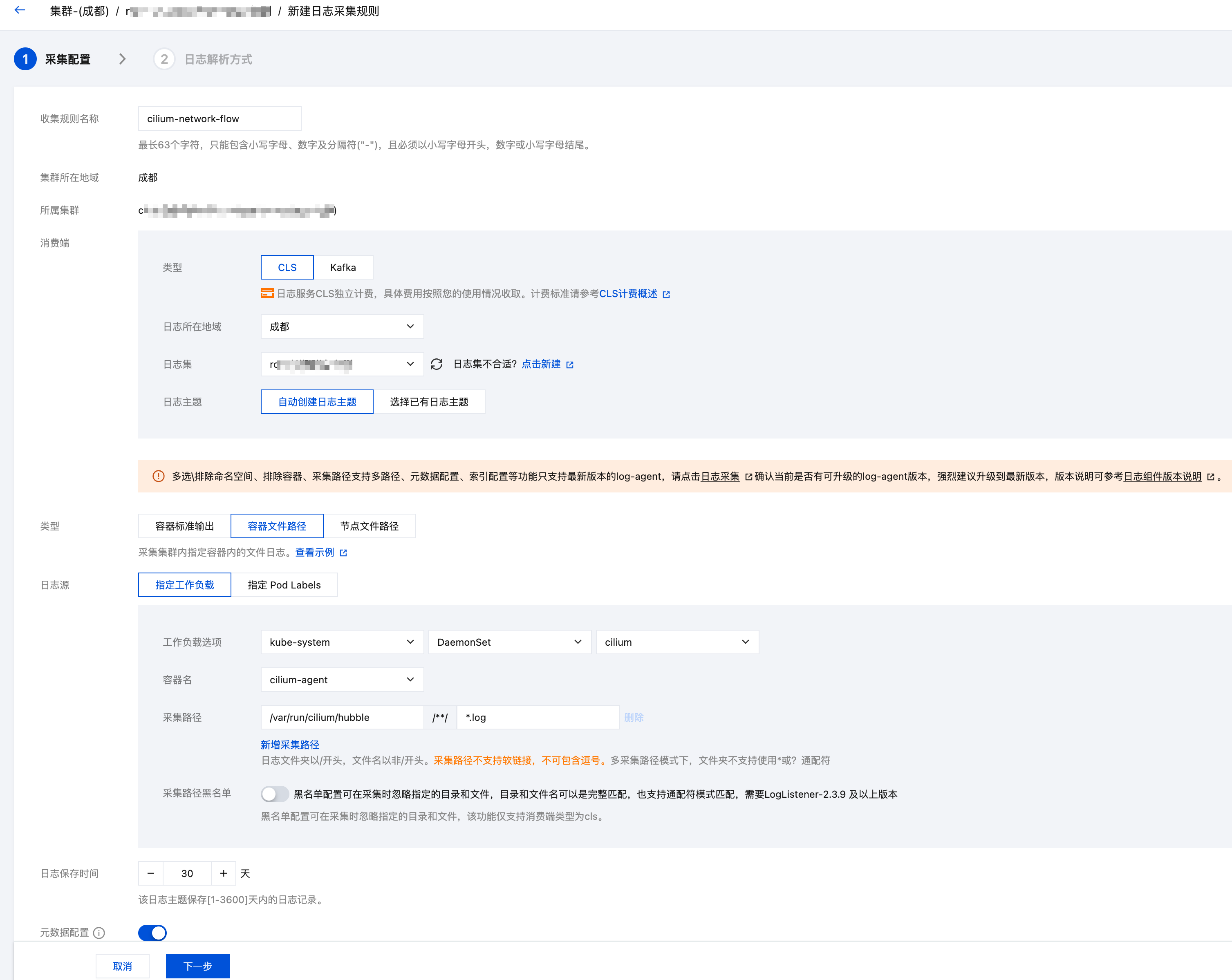
Configure TKE log collection to collect all log files from cilium-agent to CLS.
Enable Log Collection
Before configuring log collection rules, ensure the cluster has log collection enabled. In the console, navigate to: Monitor & Alert > Log > Business Log.
YAML Configuration (Recommended)
TKE uses the LogConfig CRD to configure log collection rules. This approach allows quick index configuration without extensive manual operations in the console. The complete LogConfig configuration is as follows:
Apply with
kubectl apply -f <your-logconfig-yaml-file>.
Replace the relevant fields based on the comments.
apiVersion: cls.cloud.tencent.com/v1
kind: LogConfig
metadata:
  name: cilium-flow-logs
spec:
  clsDetail:
    region: ap-chengdu # 替换成你的 CLS 所在地域,可用列表参考 https://cloud.tencent.com/document/product/614/18940
    logsetName: "TKE-cls-k398qwbj-102564" # 替换成你的 CLS 日志集名称。如果存在该名称的日志集,则会使用该日志集,如果不存在,则会新建一个该名称的日志集。
    topicName: "tke-cls-k398qwbj-cilium-flow-logs" # 替换成你的 CLS 日志主题名称,自动创建出来的日志主题会使用该名称。
    extractRule:
      backtracking: "0"
      isGBK: "false"
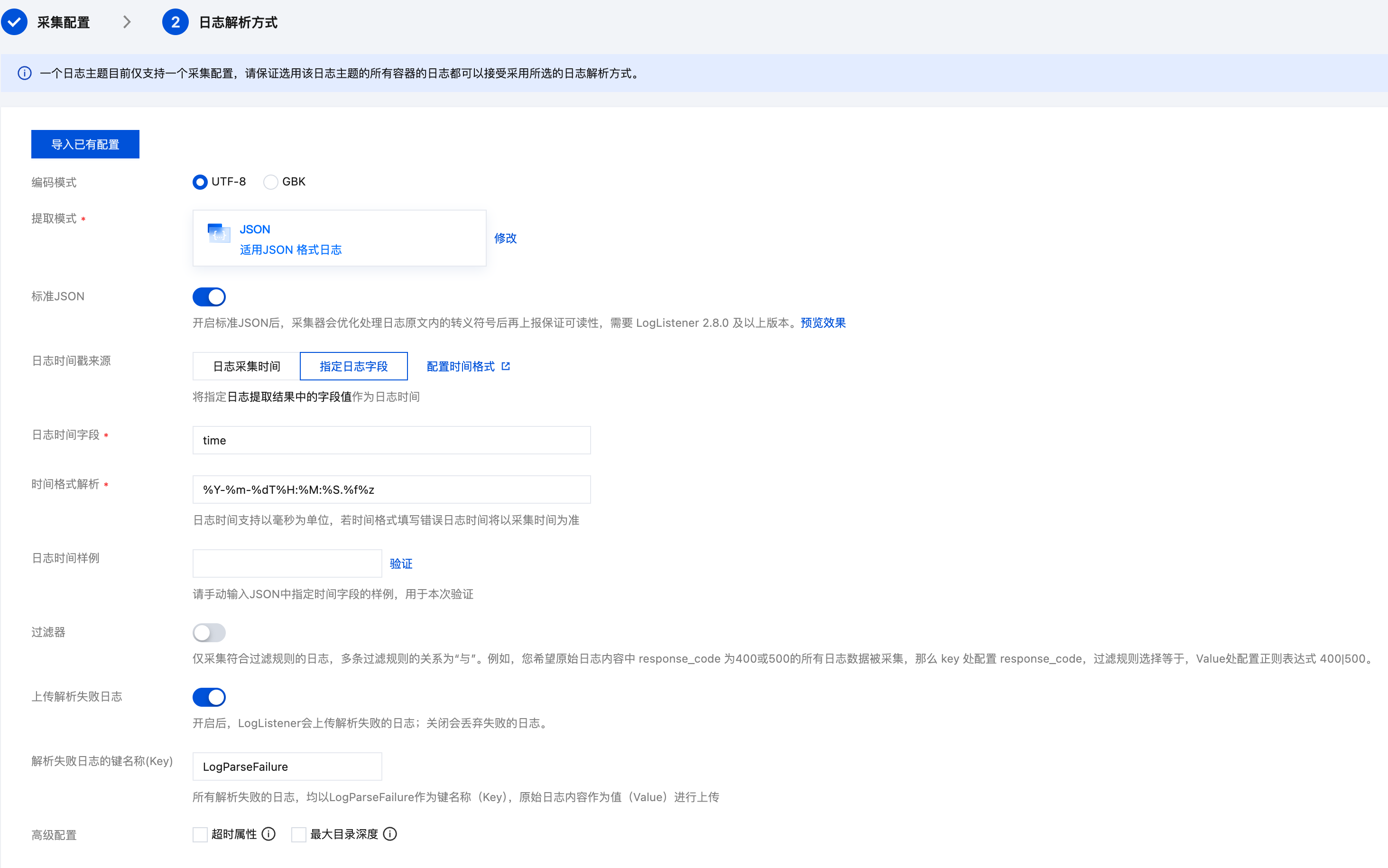
      jsonStandard: "true"
      timeFormat: '%Y-%m-%dT%H:%M:%S.%f%z'
      timeKey: time
      unMatchUpload: "true"
      unMatchedKey: LogParseFailure
    indexStatus: "on"
    indexs:
    - indexName: namespace
      indexType: text
      tokenizer: "@&?|#()='\",;:<>[]{}/ \n\t\r\\"
      containZH: false
    - indexName: pod_name
      indexType: text
      tokenizer: "@&?|#()='\",;:<>[]{}/ \n\t\r\\"
      containZH: false
    - indexName: container_name
      indexType: text
      tokenizer: "@&?|#()='\",;:<>[]{}/ \n\t\r\\"
      containZH: false
    - indexName: flow.verdict
      indexType: text
      tokenizer: "@&?|#()='\",;:<>[]{}/ \n\t\r\\"
      containZH: false
    - indexName: flow.uuid
      indexType: text
      tokenizer: "@&?|#()='\",;:<>[]{}/ \n\t\r\\"
      containZH: false
    - indexName: flow.drop_reason_desc
      indexType: text
      tokenizer: "@&?|#()='\",;:<>[]{}/ \n\t\r\\"
      containZH: false
    - indexName: flow.source.pod_name
      indexType: text
      tokenizer: "@&?|#()='\",;:<>[]{}/ \n\t\r\\"
      containZH: false
    - indexName: flow.source.namespace
      indexType: text
      tokenizer: "@&?|#()='\",;:<>[]{}/ \n\t\r\\"
      containZH: false
    - indexName: flow.source.cluster_name
      indexType: text
      tokenizer: "@&?|#()='\",;:<>[]{}/ \n\t\r\\"
      containZH: false
    - indexName: flow.source.labels
      indexType: text
      tokenizer: "@&?|#()='\",;:<>[]{}/ \n\t\r\\"
      containZH: false
    - indexName: flow.source.identity
      indexType: text
      tokenizer: "@&?|#()='\",;:<>[]{}/ \n\t\r\\"
      containZH: false
    - indexName: flow.destination.pod_name
      indexType: text
      tokenizer: "@&?|#()='\",;:<>[]{}/ \n\t\r\\"
      containZH: false
    - indexName: flow.destination.namespace
      indexType: text
      tokenizer: "@&?|#()='\",;:<>[]{}/ \n\t\r\\"
      containZH: false
    - indexName: flow.destination.cluster_name
      indexType: text
      tokenizer: "@&?|#()='\",;:<>[]{}/ \n\t\r\\"
      containZH: false
    - indexName: flow.destination.labels
      indexType: text
      tokenizer: "@&?|#()='\",;:<>[]{}/ \n\t\r\\"
      containZH: false
    - indexName: flow.destination.identity
      indexType: text
      tokenizer: "@&?|#()='\",;:<>[]{}/ \n\t\r\\"
      containZH: false
    - indexName: flow.destination_service.name
      indexType: text
      tokenizer: "@&?|#()='\",;:<>[]{}/ \n\t\r\\"
      containZH: false
    - indexName: flow.destination_service.namespace
      indexType: text
      tokenizer: "@&?|#()='\",;:<>[]{}/ \n\t\r\\"
      containZH: false
    - indexName: flow.IP.ipVersion
      indexType: text
      tokenizer: "@&?|#()='\",;:<>[]{}/ \n\t\r\\"
      containZH: false
    - indexName: flow.IP.source
      indexType: text
      tokenizer: "@&?|#()='\",;:<>[]{}/ \n\t\r\\"
      containZH: false
    - indexName: flow.IP.destination
      indexType: text
      tokenizer: "@&?|#()='\",;:<>[]{}/ \n\t\r\\"
      containZH: false
    - indexName: flow.l4
      indexType: text
      tokenizer: "@&?|#()='\",;:<>[]{}/ \n\t\r\\"
      containZH: false
    - indexName: flow.l7
      indexType: text
      tokenizer: "@&?|#()='\",;:<>[]{}/ \n\t\r\\"
      containZH: false
    - indexName: flow.l4.TCP.source_port
      indexType: long
    - indexName: flow.l4.TCP.destination_port
      indexType: long
    - indexName: flow.l4.UDP.source_port
      indexType: long
    - indexName: flow.l4.UDP.destination_port
      indexType: long
    - indexName: flow.event_type.type
      indexType: text
      tokenizer: "@&?|#()='\",;:<>[]{}/ \n\t\r\\"
      containZH: false
    - indexName: flow.event_type.sub_type
      indexType: text
      tokenizer: "@&?|#()='\",;:<>[]{}/ \n\t\r\\"
      containZH: false
    - indexName: flow.Summary
      indexType: text
      tokenizer: "@&?|#()='\",;:<>[]{}/ \n\t\r\\"
      containZH: false
    - indexName: flow.traffic_direction
      indexType: text
      tokenizer: "@&?|#()='\",;:<>[]{}/ \n\t\r\\"
      containZH: false
    - indexName: flow.trace_reason
      indexType: text
      tokenizer: "@&?|#()='\",;:<>[]{}/ \n\t\r\\"
      containZH: false
    - indexName: flow.is_reply
      indexType: text
      tokenizer: "@&?|#()='\",;:<>[]{}/ \n\t\r\\"
      containZH: false
    - indexName: flow.Type
      indexType: text
      tokenizer: "@&?|#()='\",;:<>[]{}/ \n\t\r\\"
      containZH: false
    - indexName: flow.node_labels
      indexType: text
      tokenizer: "@&?|#()='\",;:<>[]{}/ \n\t\r\\"
      containZH: false
    - indexName: flow.file
      indexType: text
      tokenizer: "@&?|#()='\",;:<>[]{}/ \n\t\r\\"
      containZH: false
    autoIndex: "true"
    logFormat: default
    logType: json_log
    maxSplitPartitions: 0
    period: 30
    storageType: ""
  inputDetail:
    type: container_file
    containerFile:
      namespace: kube-system
      workload:
        kind: daemonset
        name: cilium
      container: cilium-agent
      filePaths:
      - file: '*.log'
        path: /var/run/cilium/hubble
      metadataContainer:
      - namespace
      - pod_name
      - pod_ip
      - pod_uid
      - container_id
      - container_name
      - image_name
      - cluster_id
      metadataLabels:
      - __NULL__
      nodeMetadataLabels:
      - __NULL__
Console Configuration
If needed, you can also configure log collection rules in the TKE console. Go to the cluster's Monitor & Alert > Log > Business Log and create a new log rule. Screenshots for reference:
CLS Search Examples
After logs are delivered to CLS, you can search and analyze them from various dimensions in the CLS console. Here are some common search queries:
Query All Network Flow Logs for a Pod
flow.source.pod_name:"nginx-deployment-abc123" OR flow.destination.pod_name:"nginx-deployment-abc123"
Query Denied Traffic
flow.verdict:"DROPPED"
View detailed drop reasons:
flow.verdict:"DROPPED" | select flow.drop_reason_desc, flow.source.namespace, flow.source.pod_name, flow.destination.namespace, flow.destination.pod_name, count(*) as cnt group by flow.drop_reason_desc, flow.source.namespace, flow.source.pod_name, flow.destination.namespace, flow.destination.pod_name order by cnt desc
Filter by Namespace
Query all traffic originating from the default namespace:
flow.source.namespace:"default"
Query all traffic destined for the kube-system namespace:
flow.destination.namespace:"kube-system"
Filter by Port
Query traffic with destination port 80:
flow.l4.TCP.destination_port:80
Query All Traffic for an IP
flow.IP.source:"10.0.1.100" OR flow.IP.destination:"10.0.1.100"
Filter by Traffic Direction
View only ingress traffic:
flow.traffic_direction:"INGRESS"
Related Products
Tencent Cloud Network Flow Logs FL provides similar network flow log functionality based on the VPC layer. The differences from Cilium Hubble network flow logs are:
| Feature | Cilium Hubble Network Flow Logs | Tencent Cloud Network Flow Logs FL |
|---|---|---|
| Collection layer | Pod level, based on eBPF | VPC level, based on ENI |
| Information richness | Includes Pod name, labels, namespace, NetworkPolicy verdict, and even L7 info | Mainly IP, port, protocol, etc. |
| Filtering capabilities | Supports filtering by Pod, labels, verdict, and other K8s dimensions | Supports filtering by VPC, subnet, ENI |
| Use cases | Kubernetes in-cluster network observability | VPC-level network traffic audit |
Choose based on your requirements. The two can also complement each other: Cilium provides fine-grained K8s-level network flow logs, while FL provides VPC-level global network flow logs.
FAQ
Where is the Hubble dynamic log export configuration stored?
It is stored in the ConfigMap kube-system/cilium-flowlog-config. You can view the current configuration with kubectl:
$ kubectl -n kube-system get cm cilium-flowlog-config -o yaml
apiVersion: v1
data:
  flowlogs.yaml: |
    flowLogs:
      - excludeFilters:
        - source_ip:
          - 169.254.0.71
        - destination_ip:
          - 169.254.0.71
        filePath: /var/run/cilium/hubble/events-all.log
        name: all
kind: ConfigMap
metadata:
  annotations:
    meta.helm.sh/release-name: cilium
    meta.helm.sh/release-namespace: kube-system
  creationTimestamp: "2026-02-24T08:35:22Z"
  labels:
    app.kubernetes.io/managed-by: Helm
  name: cilium-flowlog-config
  namespace: kube-system
  resourceVersion: "3969239884"
  uid: 87978d03-638a-4c31-80d2-0a3e0fe17049
Why was the CLS topic not automatically created?
Ensure both logsetName and topicName are configured, there is no existing topic with the same name as topicName, and do not specify topicId or logsetId.
Where can I find the complete LogConfig field reference?
Refer to the LogConfig JSON format documentation for the complete LogConfig field reference.
Why add 169.254.0.71 in excludeFilters?
169.254.0.71 is the destination IP of the CLS API address. The collected logs are eventually reported through this IP. If no includeFilters are specified, you should add this excludeFilter to prevent the CLS log reporting traffic from being recorded as cilium network flow logs, which would then be collected and reported again, creating an infinite loop of collection and reporting. Even without other network traffic, this would continuously generate and collect new logs, causing unnecessary overhead.